

Cov teeb meem ntsig txog teeb liab blockers (tseem hu uateeb liab disruptors) muaj ntau heev. Kev nkag siab txog lawv txoj hauv kev ua haujlwm, kev tiv thaiv ntau yam thiab cov kev cai lij choj tuaj yeem pab peb kom pom cov khoom siv no raug. Lub hauv paus ntsiab lus ua haujlwm tseem ceeb yog kom tawm suab nrov heev cuam tshuam ntawm qee zaus. Cov suab nrov no yuav "dhau" cov cim kev sib txuas lus ib txwm muaj, tiv thaiv cov khoom siv xws li xov tooj ntawm tes thiab routers los ntawm kev tsim cov kev sib txuas ruaj khov nrog cov chaw nres tsheb hauv paus lossis cov chaw teeb liab, yog li ua tiav cov txiaj ntsig ntawm kev tiv thaiv teeb liab.
Qhov twg lub teeb liab blocker tuaj yeem tiv thaiv tag nrho ntawm nws lub hom phiaj tsim thiab qib zog. Nws tuaj yeem raug cais tshwj xeeb rau hauv ob pawg hauv qab no:
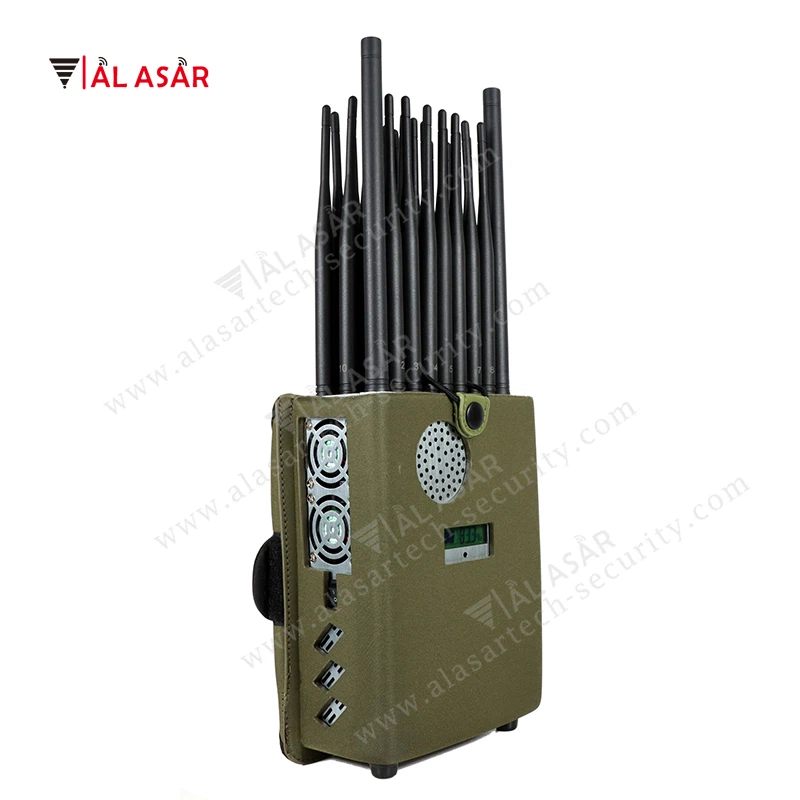
Ua ntej, ib qho kev thaiv cov teeb liab (lub hom phiaj tseem ceeb ntawm pej xeem- qib tiv thaiv cov cuab yeej)
Lub hom phiaj tsim ntawm pej xeem- qib tiv thaiv cov cuab yeej feem ntau yog los tiv thaiv kev sib txuas lus hauv zej zog thiab cov teeb liab wireless tau ntsib hauv lub neej niaj hnub. Cov hauv qab no yog cov hom phiaj tseem ceeb:
1. Public mobile networks (2G, 3G, 4G, 5G)
Qhov no yog lub hom phiaj tseem ceeb ntawm tus blocker. Nws tuaj yeem npog tag nrho cov kev sib txuas lus ntau zaus uas siv los ntawm cov xov tooj ntawm tes. Tom qab raug thaiv, lub xov tooj yuav tso saib "tsis muaj kev pabcuam" lossis "tsuas yog hu xovtooj xwm ceev nkaus xwb" raug tso cai. Nws yuav tsis tuaj yeem hu xov tooj, xa ntawv, lossis siv cov ntaub ntawv xov tooj ntawm tes rau kev siv internet. Txij li cov qauv kev sib txuas lus sib txawv (xws li GSM, CDMA, WCDMA, LTE, NR) sib haum mus rau qhov sib txawv zaus, tag nrho -frequency civilian blocker yuav npog tag nrho cov zaus bands ntawm cov qauv no kom ntseeg tau tias muaj kev thaiv tag nrho ntawm lub xov tooj ntawm tes.
2. Wi-Fi signals (2.4GHz, 5GHz, 6GHz)
Tus blocker yuav cuam tshuam tag nrho cov zaus siv ntau zaus ntawm Wi-Fi. Tsis muaj teeb meem dab tsi ntau zaus cov cuab yeej sim txuas mus rau, lub teeb liab yuav cuam tshuam nrog, tiv thaiv kev sib txuas ua tiav thiab thaum kawg ua rau cuam tshuam ntawm lub wireless network, ua rau nws tsis tuaj yeem ua haujlwm hauv network xws li web browsing thiab hloov ntaub ntawv.
3. Bluetooth teeb liab (2.4GHz)
Cov khoom siv Bluetooth (xws li Bluetooth headphones, Bluetooth keyboards, Bluetooth nas, Bluetooth tham, thiab lwm yam) txhua tus sib txuas lus siv 2.4GHz zaus band. Kev cuam tshuam los ntawm tus blocker ntawm qhov zaus band no yuav cuam tshuam ncaj qha rau txhua qhov kev sib txuas Bluetooth, tiv thaiv cov cuab yeej los ntawm kev sib txuas kom raug thiab tseem tiv thaiv cov ntaub ntawv xa mus.
4. Satellite positioning signals (GPS, Beidou, GLONASS)
Hom teeb liab tiv thaiv no feem ntau yog tsom rau kev ua haujlwm ntawm cov khoom siv. Tom qab muaj kev cuam tshuam, cov khoom siv xws li xov tooj ntawm tes, tsheb navigation systems, thiab cov dav hlau tsis muaj neeg tsav tsheb uas tso siab rau qhov chaw satellite yuav tsis tuaj yeem tau txais cov ntaub ntawv qhov chaw raug thiab yuav tsis muaj peev xwm ua qhov kev taw qhia thiab qhov chaw taug qab cov haujlwm.
Thib ob, qhia tias tshwj xeeb lossis siab -cov khoom siv tiv thaiv lub zog tuaj yeem thaiv
Sib nrug los ntawm pej xeem- qib tiv thaiv cov cuab yeej, qee qhov muaj zog thiab tiv thaiv cov cuab yeej tiv thaiv (feem ntau yog siv rau tub rog lossis cov tub ceev xwm tshwj xeeb) tuaj yeem thaiv cov cim tshwj xeeb hauv qab no:
1. Xov tooj cua walkie-talkie teeb liab (xws li UHF/VHF zaus bands)
Hom ntaub thaiv no tuaj yeem cuam tshuam nrog UHF uas nquag siv (ultra- siab zaus) thiab VHF (hloov siab heev) zaus bands ntawm xov tooj cua walkie-talkies, thaiv lub suab sib txuas lus ntawm walkie-talkies. Nws yog feem ntau siv rau hauv cov xwm txheej uas muaj kev sib txuas lus nruj heev uas yuav tsum tau ua.
2. Cov teeb liab tswj chaw taws teeb (xws li cov los ntawm drone cov chaw taws teeb tswj, cov chaw taws teeb tswj tshwj xeeb)
Muaj peev xwm cuam tshuam nrog cov zaus tshwj xeeb uas siv los ntawm drone cov chaw taws teeb tswj, qee cov chaw taws teeb - tswj cov foob pob hluav taws, thiab lwm yam, tiv thaiv cov khoom siv tswj chaw taws teeb los ntawm kev xa cov lus qhia mus rau lub hom phiaj. Lawv feem ntau yog siv rau hauv kev tshwj xeeb xws li kev tiv thaiv kev nyab xeeb thiab tawm tsam-kev ua phem.
3. RFID/NFC Cov Lus Qhia
Cov cim no tuaj yeem tiv thaiv. RFID (Xov tooj cua zaus txheeb xyuas) thiab NFC (Nyob rau hauv Kev Sib Txuas Lus) cov teeb liab feem ntau yog siv rau hauv daim npav nkag, daim npav them nyiaj, thiab cov khoom siv hluav taws xob, thiab lwm yam. Thaum tiv thaiv, lawv tuaj yeem tiv thaiv kev dag los ntawm micro RFID / NFC cov khoom siv. Lawv feem ntau yog siv rau hauv cov chaw kuaj mob, cov rooj sib tham tsis pub lwm tus paub, thiab lwm lub sijhawm uas yuav tsum muaj kev tswj hwm nruj.
Peb yog ibTuam Tshoj chaw tsim khoom tshwj xeeb hauv kev cai - ua teeb liab blockers. Peb muab ntau yamteeb liab cuam tshuamrau koj xaiv thiab customization. Yog tias koj muaj kev xav tau, thov hu rau peb ntawm info@alasartech-security.com.


